
Visual Effects and CGI
iRender – High-Performance GPU Render Farm (Irendering.Net)
Summary: iRender’s 2026 guide for freelance 3D artists argues that the cheapest rendering solution isn’t the lowest hourly rate but the lowest total project cost, factoring in setup time, render speed, and workflow flexibility. The article compares four options—local PCs, DIY GPU marketplaces like Vast.ai and RunPod, professional cloud workstations, and traditional render farms—and positions cloud workstations as the best balance for professionals with tight deadlines. It highlights hidden costs of DIY servers, such as driver configuration and troubleshooting, which can negate low advertised prices. The piece is effectively a vendor pitch for iRender’s dedicated RTX 4090 cloud workstations, but it also reflects a broader market shift toward total-cost-of-ownership thinking in freelance rendering.
Why it matters: For freelance VFX and CGI artists, the decision between local rendering, DIY GPU rentals, and managed cloud workstations directly impacts project margins and deadline reliability. This article signals that the market is maturing beyond raw GPU price comparisons toward service-level value, which could reshape how freelancers allocate their rendering budgets.
Context: The render farm market has seen a proliferation of low-cost GPU rental platforms, but freelancers often lack the DevOps skills to use them efficiently. iRender’s push for cloud workstations with pre-installed software and admin access is a response to the friction of unmanaged infrastructure, a pattern also seen in other creative software verticals.
"A cloud workstation that costs $3 per hour but finishes a job in one hour may actually be more economical than a DIY GPU server that costs only $0.50 per hour but requires several hours of setup and significantly longer render times." — IRENDERING.NET
Commentary: The article’s framing is a classic total-cost-of-ownership argument, but it’s also a direct attack on the DIY GPU marketplace model that has undercut traditional render farms. For freelancers, the real takeaway is that time-to-delivery and setup overhead are now the dominant cost drivers, not just GPU clock speed. Expect more vendors to bundle pre-configured environments and support as a differentiator, blurring the line between raw infrastructure and managed services. The risk is that freelancers overpay for convenience when their actual workload is simple enough for a traditional farm or local render.
Date: July 31, 2026 11:00 PM ET
URL: https://irendering.net/cheapest-way-to-render-3d-on-a-freelancer-budget-2026
AI Sentiment Score: Negative (77%)
AI Credibility Score: 10.0/10 — High
Scores and text generated by AI analysis of the source article indicated.
How much Intelligence in DaVinci Resolve’s AI? (Digitalproduction)
Summary: Blackmagic’s DaVinci Resolve 21 ships a suite of on-device neural-network tools, with IntelliSearch as the standout for media management and slate reading. Testing on a Mac mini M4 Pro shows the ‘Better’ model set demands serious RAM and GPU resources—24 GB unified memory is borderline, and UHD analysis can trigger swapping. The feature is genuinely useful for documentary and post workflows, but its GUI is scattered and metadata editing is clunky. The bigger takeaway: Blackmagic is betting on local AI as a privacy-preserving, license-dongle-friendly alternative to cloud-based training, a positioning that could reshape vendor trust in the post pipeline.

Why it matters: For post houses and DITs, IntelliSearch’s local-first AI changes the cost-benefit calculus of metadata tagging and slate transcription—but only if you budget for the hardware it demands. The RAM and VRAM requirements could force upgrade decisions for facilities still running 16 GB workstations.
Context: Blackmagic has been adding ‘neural network’ features to Resolve for several releases, but Resolve 21 marks the first time AI is woven into core media management and slate ID. The company’s on-device approach contrasts with cloud-based AI tools from Adobe and others, which have faced pushback over data privacy and training on user content.
"While BM considers 16 GB sufficient on the Mac, we wouldn’t suggest doing that, according to our results. Rather get 48 GB, or even 64 for some future proofing, even if it hurts the purse." — DIGITALPRODUCTION
Commentary: The hardware ceiling is the real story here: IntelliSearch’s ‘Better’ model nearly maxed out 24 GB of unified memory on a 1.5-hour HD project, and UHD indexing pushed it into swap. That means the feature is effectively gated for anyone not on a maxed-out Mac Studio or a high-VRAM PC—a silent tax on smaller shops. The slate-reading accuracy is genuinely impressive and could save hours on poorly documented footage, but the workflow friction (one-by-one clicks, no in-window editing) suggests Blackmagic shipped the core AI but skimped on the UX polish. Expect third-party metadata tools to fill that gap, or for Blackmagic to iterate quickly in a point release.
Date: July 29, 2026 02:00 AM ET
URL: https://digitalproduction.com/2026/07/29/how-much-intelligence-in-davinci-resolves-ai/
AI Sentiment Score: Positive (60%)
AI Credibility Score: 10.0/10 — High
Scores and text generated by AI analysis of the source article indicated.
LaCie 8big Pro5: The Big Box (Digitalproduction)
Summary: LaCie’s 8big Pro5 is an eight-bay Thunderbolt 5 DAS aimed at editors, DITs, and finishing rooms needing large local media volumes. The 192 TB review unit delivered strong sequential throughput (up to 2.08 GB/s write in ATTO) but required a twelve-day RAID 50 initialization and demands careful Windows host compatibility. Priced around €11,500 for the 192 TB version, it’s a capital-equipment purchase that currently carries an ‘AI bubble tax’ on storage. The verdict: a serious, stable workhorse for the right environment, provided you plan for setup time, noise, and host verification.
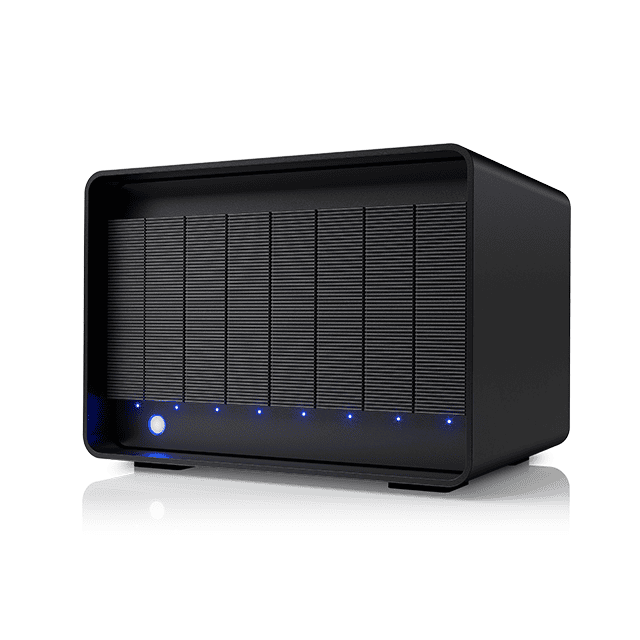
Why it matters: For post houses and DITs, the 8big Pro5 represents a high-capacity DAS alternative to NAS, but its deployment realities—twelve-day initialization, Thunderbolt host dependency, and current storage pricing inflation—directly affect project timelines and budget planning.
Context: Storage prices are surging due to AI hyperscaler demand, making large-capacity arrays a significant capital outlay. The 8big Pro5’s Thunderbolt 5 interface and hardware RAID options position it as a premium local-storage solution, but its practical fit depends on host ecosystem and workflow tolerance for long setup.
"Our preferred RAID 50 configuration took twelve days to initialise. Not twelve hours. Twelve days." — DIGITALPRODUCTION
Commentary: The twelve-day initialization is a hidden deployment cost that studios must factor into scheduling—this isn’t a plug-and-play device. The Thunderbolt 5 host dependency, especially on Windows, means procurement teams need to verify the entire chain before purchase, not just the enclosure. The ‘AI bubble tax’ on storage pricing is a real market signal: if you can delay a large-capacity purchase, the economics may improve, but for productions with immediate needs, the 8big Pro5’s throughput and build quality justify the premium. The lack of a NAS option keeps it a single-workstation tool, so teams expecting shared access will need to budget for a host server or look elsewhere.
Date: July 27, 2026 02:00 AM ET
URL: https://digitalproduction.com/2026/07/27/lacie-8big-pro5-the-big-box/
AI Sentiment Score: Negative (66%)
AI Credibility Score: 10.0/10 — High
Scores and text generated by AI analysis of the source article indicated.
Blackmagic Shrinks 12G-SDI I/O (Digitalproduction)
Summary: Blackmagic Design has introduced the UltraStudio Mini 12G family, three bus-powered Thunderbolt 4 I/O boxes that split capture, playback, and bidirectional replay functions across dedicated models. The Recorder and Monitor are priced at $445, while the Replay adds fill/key output and an independent monitoring path for $559. All models support SD through DCI 4K, hardware color-space and alpha conversion, and integrate with DaVinci Resolve, Fusion, and third-party software via the Desktop Video SDK. The lineup targets compact news, replay, and graphics positions where a full-size interface is overkill.

Why it matters: For post houses and broadcast graphics teams, this is a low-cost, bus-powered path to hardware fill/key output and 12G-SDI I/O without a full DeckLink card or a rack of converters. The Replay model specifically lowers the barrier for Resolve-based live graphics and replay workflows, potentially shifting small studios away from software-only keying or expensive dedicated hardware.
Context: Blackmagic continues to segment its I/O hardware by function, a departure from the multi-purpose, feature-stuffed interfaces that dominate the market. The UltraStudio Mini line now covers the low end of the Thunderbolt ecosystem, complementing the company’s larger UltraStudio and DeckLink offerings.
"Fill carries the colour image. Key carries the matte that tells the production switcher where and how strongly to composite it. This is materially different from playing a graphic already flattened against black and hoping the switcher understands the artistic intention." — DIGITALPRODUCTION
Commentary: The Replay model’s dedicated fill/key outputs and independent monitoring path are the real news here—at $559, it undercuts any comparable hardware and makes hardware keying accessible to small news and esports operations. But the bus-power-only design means the host Thunderbolt port becomes a single point of failure, and the lack of a reference input will limit use in larger, genlocked facilities. Expect this to accelerate the shift toward software-defined graphics pipelines, where the box is just a transport layer and the creative tools remain in the host.
Date: July 30, 2026 03:00 AM ET
URL: https://digitalproduction.com/2026/07/30/blackmagic-shrinks-12g-sdi-i-o/
AI Sentiment Score: Negative (83%)
AI Credibility Score: 10.0/10 — High
Scores and text generated by AI analysis of the source article indicated.
Post ID: efde6909